
By Default Blogger shows Error page message in a box and its not look Style.
Here I am saying about how to Customize it much better...
Only Custom message [No Style]
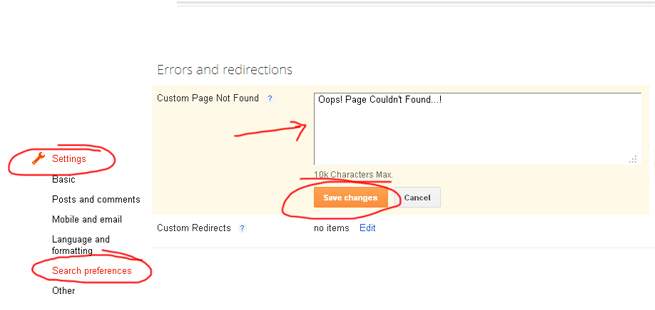
If you want to show only a custom message then First Go to updated Blogger InterfaceThen Go to Setting->Search Preferences
Error Message with Stylish 404 images
If you want Colorful Stylish 404 page do the following.- Go to Design->Edit HTML
- Find </head> and copy the below code just above it.
<b:if cond='data:blog.pageType == "error_page"'>
<style type="text/css">.status-msg-wrap{font-size:100%;margin:none;position:static;width:100%}.status-msg-border{display:none}.status-msg-body{padding:none;position:static;text-align:inherit;width:100%;z-index:auto}.status-msg-wrap a{padding:none;text-decoration:inherit}</style>
</b:if>
<style type="text/css">.status-msg-wrap{font-size:100%;margin:none;position:static;width:100%}.status-msg-border{display:none}.status-msg-body{padding:none;position:static;text-align:inherit;width:100%;z-index:auto}.status-msg-wrap a{padding:none;text-decoration:inherit}</style>
</b:if>
- Save the Template

Error Page Style 1

- Go to Setting->Search Preferences
- Copy below code in Custom Page Not Found section [as shown in fig. first]
<h2 style="font-size: 35px;margin: 0;text-align: center;">Oops..! </h2>
<h3 style="font-size:17px;">Sorry,You are trying to reach an invalid page...!<br><a href="/">Click here</a> to go to Homepage <br> Have a nice Day...</h3><img src="https://blogger.googleusercontent.com/img/b/R29vZ2xl/AVvXsEjU4Na00ihNCFzVP4dQDzOUvWjrtU1B-dfZ10knJZDC4TjeuMyxtl-rUl_K7n-7qog1x0EL_EzHMQ3_tsKpbZ94A_ja2Iyv7zY_zexQy4liZ0yf9Mp-D8ectpC6dLw1zwFUobzY6Fxwdow/s1600/404+error+page+1.jpg"/>
<h3 style="font-size:17px;">Sorry,You are trying to reach an invalid page...!<br><a href="/">Click here</a> to go to Homepage <br> Have a nice Day...</h3><img src="https://blogger.googleusercontent.com/img/b/R29vZ2xl/AVvXsEjU4Na00ihNCFzVP4dQDzOUvWjrtU1B-dfZ10knJZDC4TjeuMyxtl-rUl_K7n-7qog1x0EL_EzHMQ3_tsKpbZ94A_ja2Iyv7zY_zexQy4liZ0yf9Mp-D8ectpC6dLw1zwFUobzY6Fxwdow/s1600/404+error+page+1.jpg"/>
Error Page Style 2

- Go to Setting->Search Preferences
- Copy below code in Custom Page Not Found section [as shown in fig. first]
<h2 style="font-size: 35px;margin: 0;text-align: center;">Oops..! </h2>
<h3 style="font-size:17px;">Sorry,You are trying to reach an invalid page...!<br><a href="/">Click here</a> to go to Homepage <br> Have a nice Day...</h3><img src="https://blogger.googleusercontent.com/img/b/R29vZ2xl/AVvXsEiyu0ujf8OURhv_aNAhtZpTsDTXpHYtCdZBzZcSRZ29uYZN8giRnQSprKPxO5ve3UWUBu0oKuL3F4iLC-eHjeWC2CELy7fWsn6v-KbNocRrjXpTw4Tf4xdBA3t5Xe2TrEq8dHOo6s71skk/s1600/404+error+page+2.jpg"/>
<h3 style="font-size:17px;">Sorry,You are trying to reach an invalid page...!<br><a href="/">Click here</a> to go to Homepage <br> Have a nice Day...</h3><img src="https://blogger.googleusercontent.com/img/b/R29vZ2xl/AVvXsEiyu0ujf8OURhv_aNAhtZpTsDTXpHYtCdZBzZcSRZ29uYZN8giRnQSprKPxO5ve3UWUBu0oKuL3F4iLC-eHjeWC2CELy7fWsn6v-KbNocRrjXpTw4Tf4xdBA3t5Xe2TrEq8dHOo6s71skk/s1600/404+error+page+2.jpg"/>
Error Page Style 3

- Go to Setting->Search Preferences
- Copy below code in Custom Page Not Found section [as shown in fig. first]
<h2 style="font-size: 35px;margin: 0;text-align: center;">Oops..! </h2>
<h3 style="font-size:17px;">Sorry,You are trying to reach an invalid page...!<br><a href="/">Click here</a> to go to Homepage <br> Have a nice Day...</h3><img src="https://blogger.googleusercontent.com/img/b/R29vZ2xl/AVvXsEjHxfkxNS6S6lgvN3RIFznabUjL85OPnG2com6kxEoYMMOLjKeFMyXzee4t2M977KkajiMhk_WLc_KmybGUVOuINRBuXmWUuCe1e7LYsB3PE8oRYsnjIWNilQQwlKQWZXd955i0jBLQ3K0/s1600/404+error+page+4.jpg"/>
<h3 style="font-size:17px;">Sorry,You are trying to reach an invalid page...!<br><a href="/">Click here</a> to go to Homepage <br> Have a nice Day...</h3><img src="https://blogger.googleusercontent.com/img/b/R29vZ2xl/AVvXsEjHxfkxNS6S6lgvN3RIFznabUjL85OPnG2com6kxEoYMMOLjKeFMyXzee4t2M977KkajiMhk_WLc_KmybGUVOuINRBuXmWUuCe1e7LYsB3PE8oRYsnjIWNilQQwlKQWZXd955i0jBLQ3K0/s1600/404+error+page+4.jpg"/>
Error Page Style 4

- Go to Setting->Search Preferences
- Copy below code in Custom Page Not Found section [as shown in fig. first]
<h2 style="font-size: 35px;margin: 0;text-align: center;">Oops..! </h2>
<h3 style="font-size:17px;">Sorry,You are trying to reach an invalid page...!<br><a href="/">Click here</a> to go to Homepage <br> Have a nice Day...</h3><img src="https://blogger.googleusercontent.com/img/b/R29vZ2xl/AVvXsEhiVFmHil7JQUPuVieX81ZpvYOf786inC2yWhzgVgMkZyXXvN1aaRbI92ml-m1DllEupyu98tKiU0VuK6oxGtveQ3CeAq5oKdzIDqaYIcIWYlDvqCvzu1-OvrDLzU5lVmuCLOqAvwfLStI/s320/404+error+page+6.jpg"/>
<h3 style="font-size:17px;">Sorry,You are trying to reach an invalid page...!<br><a href="/">Click here</a> to go to Homepage <br> Have a nice Day...</h3><img src="https://blogger.googleusercontent.com/img/b/R29vZ2xl/AVvXsEhiVFmHil7JQUPuVieX81ZpvYOf786inC2yWhzgVgMkZyXXvN1aaRbI92ml-m1DllEupyu98tKiU0VuK6oxGtveQ3CeAq5oKdzIDqaYIcIWYlDvqCvzu1-OvrDLzU5lVmuCLOqAvwfLStI/s320/404+error+page+6.jpg"/>
Error Page Style 5

- Go to Setting->Search Preferences
- Copy below code in Custom Page Not Found section [as shown in fig. first]
<h2 style="font-size: 35px;margin: 0;text-align: center;">Oops..! </h2>
<h3 style="font-size:17px;">Sorry,You are trying to reach an invalid page...!<br><a href="/">Click here</a> to go to Homepage <br> Have a nice Day...</h3><img src="https://blogger.googleusercontent.com/img/b/R29vZ2xl/AVvXsEgZ9vMC7lfMEAcuh4kx8XSzrznGkGpctstSQ_8LV9rPVebHrNV1iCQfElCKUcEQznfiIIZayUlTUCUuNLx25WXGXfnbQ7wry26y_ZFkEz1ghBPSVqj0VSnf2Huuxsj4iAYlEYL0Np37krc/s1600/404+error+page+7.jpg"/>
<h3 style="font-size:17px;">Sorry,You are trying to reach an invalid page...!<br><a href="/">Click here</a> to go to Homepage <br> Have a nice Day...</h3><img src="https://blogger.googleusercontent.com/img/b/R29vZ2xl/AVvXsEgZ9vMC7lfMEAcuh4kx8XSzrznGkGpctstSQ_8LV9rPVebHrNV1iCQfElCKUcEQznfiIIZayUlTUCUuNLx25WXGXfnbQ7wry26y_ZFkEz1ghBPSVqj0VSnf2Huuxsj4iAYlEYL0Np37krc/s1600/404+error+page+7.jpg"/>
Error Page Style 6

- Go to Setting->Search Preferences
- Copy below code in Custom Page Not Found section [as shown in fig. first]
<h2 style="font-size: 35px;margin: 0;text-align: center;">Oops..! </h2>
<h3 style="font-size:17px;">Sorry,You are trying to reach an invalid page...!<br><a href="/">Click here</a> to go to Homepage <br> Have a nice Day...</h3><img src="https://blogger.googleusercontent.com/img/b/R29vZ2xl/AVvXsEj41QyHZ6vimeITlJtJ-ScGR6WXPYTj7tzD36f70oXUwvMkWYbKAxQ-OqYOkQyaw82CapAjzCwBlTeNpHxOxTEx7UGLIRU-ifPqOM8leM9MYDymmUAjbLCpyyyXbt-ABKsU4KdxDqL3eK4/s1600/404+error+page+3.jpg"/>
<h3 style="font-size:17px;">Sorry,You are trying to reach an invalid page...!<br><a href="/">Click here</a> to go to Homepage <br> Have a nice Day...</h3><img src="https://blogger.googleusercontent.com/img/b/R29vZ2xl/AVvXsEj41QyHZ6vimeITlJtJ-ScGR6WXPYTj7tzD36f70oXUwvMkWYbKAxQ-OqYOkQyaw82CapAjzCwBlTeNpHxOxTEx7UGLIRU-ifPqOM8leM9MYDymmUAjbLCpyyyXbt-ABKsU4KdxDqL3eK4/s1600/404+error+page+3.jpg"/>
Then Click Save..That all..
First thanks to Bloggerplugins.com for the custom error page code, visit here. Then i made some changes and add beautiful 404 images that i was inspired from HongKiat .
I thinks this article helped you..If any bugs of doubts don't hesitate to ask..do comment...
Like and share...
lều xông hơi
ReplyDeletelều xông hơi sau sinh
xông hơi hồng ngoại
máy đốt tinh dầu điện
ReplyDeletemay khuyet
Máy xông hương
may khuyet
lều xông hơi
ReplyDeletelều xông hơi sau sinh
xông hơi hồng ngoại
ReplyDeletemẫu mộ đá đẹp
lăng mộ bằng đá
mộ đá đẹp
bậc tam cấp đá
máy tính để bàn
ReplyDeletemàn hình máy tính
màn hình máy tính giá rẻ
ReplyDeletetấm xi măng cemboard thái lan
Tấm Cemboard SCG Thái Lan
Tấm xốp Eco XPS Foam Panel
Tấm Cemboard Vĩnh Tường
ReplyDeleteLợi ích của Bàn học cho Trẻ em
Cách bài trí bàn học theo phong thủy
Kích thước bàn học trẻ em nào phù hợp với trẻ
Nhà khung thép
ReplyDeleteNhà Khung Thép giá rẻ
sàn bê tông nhẹ
cấu tạo sàn panel lắp ghép
chi phí xây dựng nhà khung thép
tấm xi măng cemboard thái lan
ReplyDeleteTấm Cemboard SCG Thái Lan
Tấm xốp Eco XPS Foam Panel
Tấm Cemboard Vĩnh Tường
ReplyDeleteLều xông hơi sau sinh
xông hơi hồng ngoại
Lều xông hơi mini
máy phun hương thơm
ReplyDeletemáy khuếch tán tinh dầu lazada
máy xông tinh dầu bằng điện
máy xông tinh dầu bằng điện tphcm
may dot tinh dau bang dien
máy xông tinh dầu phun sương
máy tính để bàn
ReplyDeletemàn hình máy tính
màn hình máy tính giá rẻ
Giường tầng hiện đại
ReplyDeleteGiường tầng thông minh
giường trẻ em
Mẫu giường tầng đẹp
Bàn học đẹp
Bàn học
ReplyDeleteBàn học đẹp
Giường tầng
Giường tầng thông minh
bàn học trẻ em
Hotline: +84963248155
Email: noithatbaoankids@gmail.com
Địa chỉ: 100 LaCasta, KĐT Mới Văn Phú, Hà Đông, Hà Nội
Trụ sở: Cầu Z, Tốt Động, Chương Mỹ, Hà Nội
Nhà máy: Tốt Động, Chương Mỹ, Hà Nội
Bàn học
ReplyDeleteBàn học đẹp
Giường tầng
Giường tầng thông minh
bàn học trẻ em
Hotline: +84963248155
Email: noithatbaoankids@gmail.com
Địa chỉ: 100 LaCasta, KĐT Mới Văn Phú, Hà Đông, Hà Nội
Trụ sở: Cầu Z, Tốt Động, Chương Mỹ, Hà Nội
Nhà máy: Tốt Động, Chương Mỹ, Hà Nội
máy tính để bàn
ReplyDeletemàn hình máy tính
màn hình máy tính giá rẻ
CÔNG TY TNHH ĐẦU TƯ CÔNG NGHỆ MÁY TÍNH NGỌC TUYỀN
MST: 0108800562 - Đăng ký & quản lý bởi Chi cục thuế Hà Nội
Đ/C: Số 295 Vũ Tông Phan, Khương Đình, Thanh Xuân, Hà Nội
Hotline: 097 123 7999 - 0939 72 5555
Email: ngoctuyencomputer68@gmail.com
Web: www.ngoctuyenpc.com
mẫu lăng mộ đá
ReplyDeletelan can đá
cây hương đá
máy tính hà nội
ReplyDeletelắp đặt phòng game
Mua máy tính cũ
màn hình máy tính cũ
tấm chống nóng
ReplyDeleteXốp cách nhiệt mái
xốp đổ bê tông
máy tính để bàn
ReplyDeletemàn hình máy tính
màn hình máy tính giá rẻ
máy tính để bàn
ReplyDeletemàn hình máy tính
màn hình máy tính giá rẻ